APIAuthenticate requests to the prefix GraphQL or REST endpoints with API keys, scoped access modes, or Repository access.
prefix.dev uses API Keys to authenticate requests from command line tools or scripts. Both, REST endpoints and GraphQL queries can be authenticated using an API Key.
You can generate an API Key via the user interface (User Icon → Settings → API Keys) or via a GraphQL mutation. We treat API Keys like passwords and never store them in plaintext. That means, after you receive the API Key you are responsible for storing and keeping it safe, as we do not have a copy of it. We only store a cryptographically secure hash on our servers.
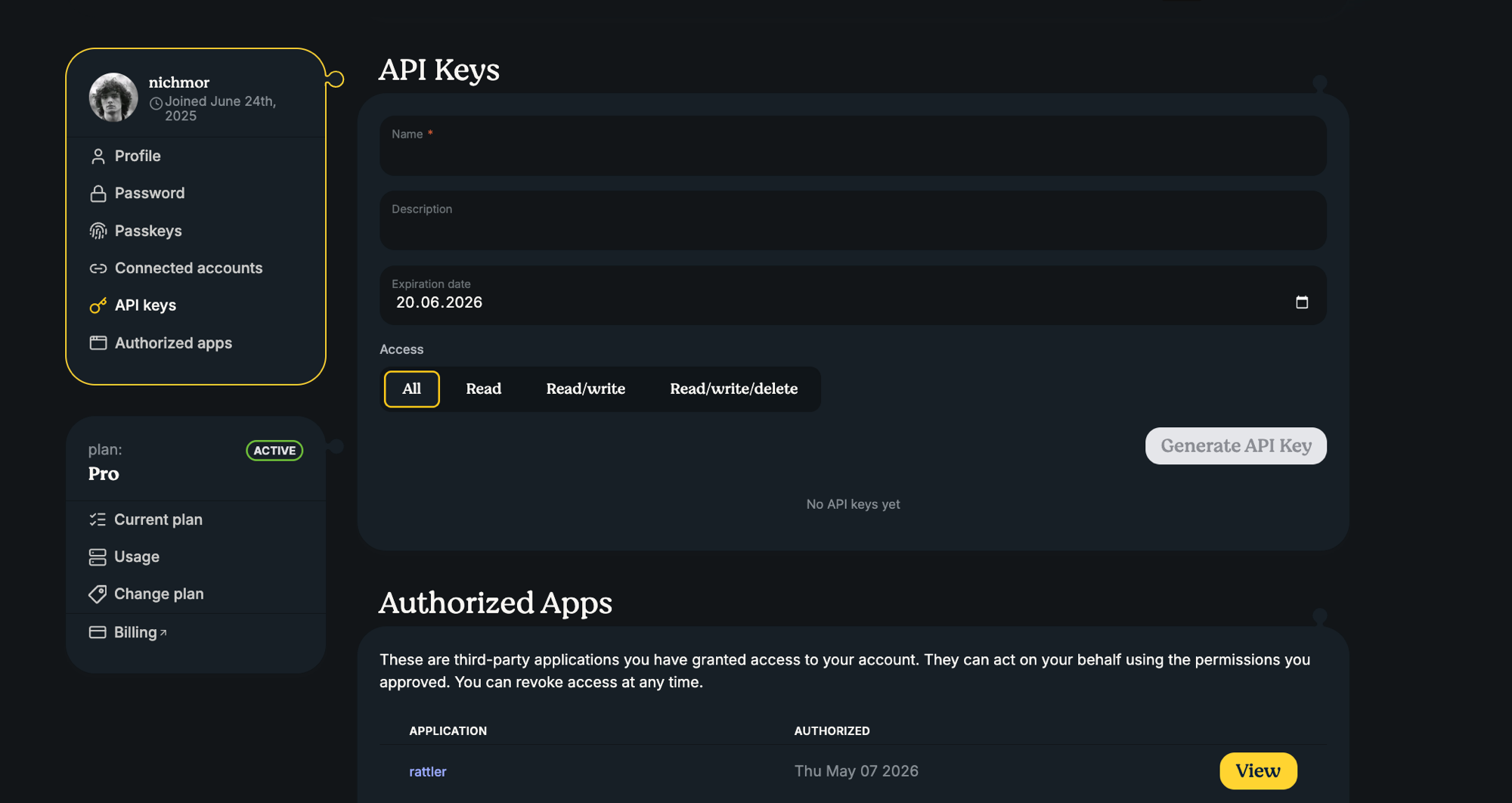
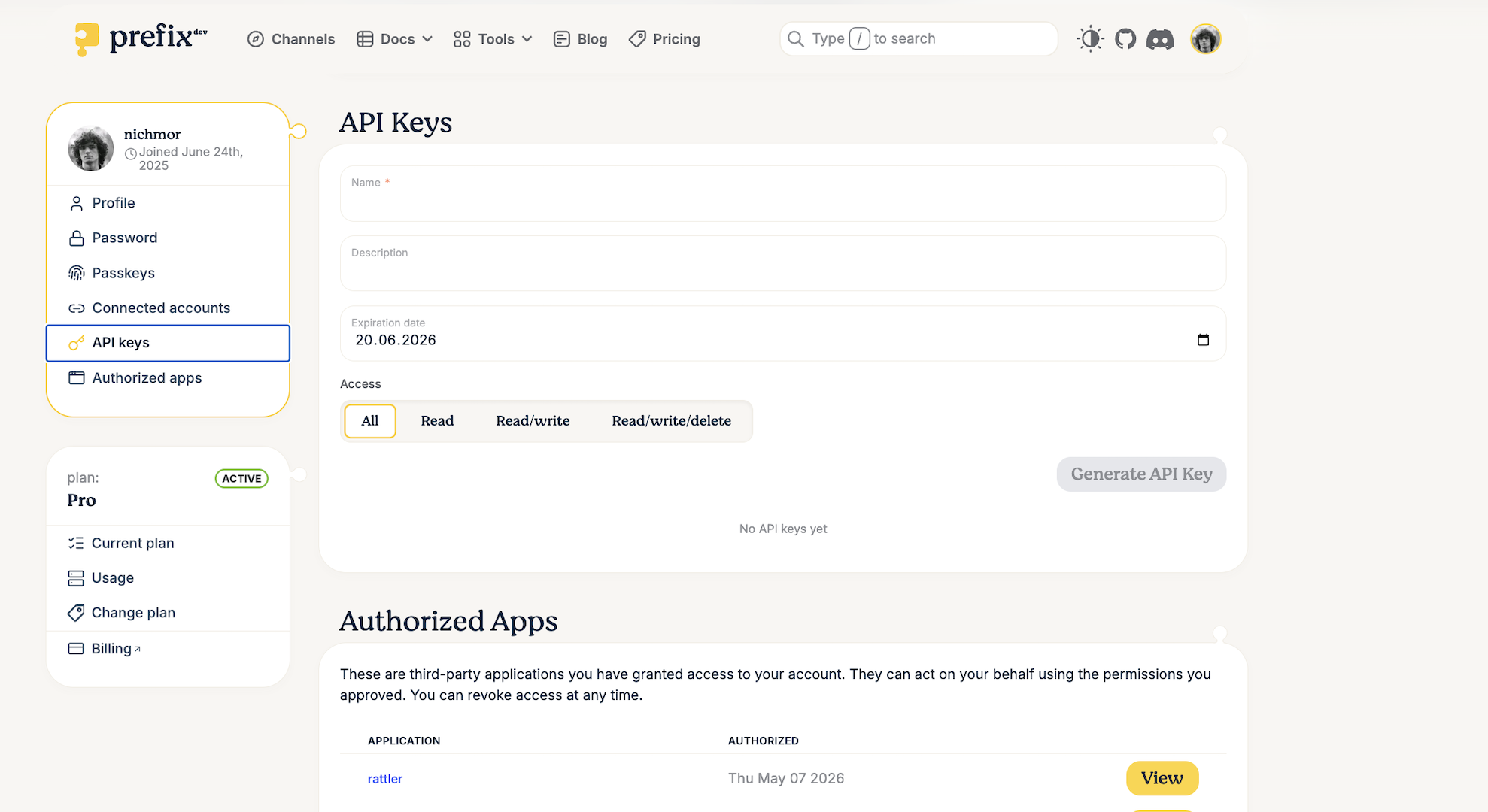
API key access modes
When you create a key, the Access selector sets what the key is allowed to do. Read, Read/write and Read/write/delete are scoped to a single channel, which you pick by its canonical path, such as acme/research. All is the legacy unscoped mode and covers every channel.
Mode | Scope | What the key can do |
|---|---|---|
Read | One private channel | Read channel metadata and download packages |
Read/write | One channel | Read, upload packages, trigger a reindex, and yank or unyank package variants |
Read/write/delete | One channel | Everything Read/write allows, plus permanently deleting package variants and force-replacing an existing filename |
All | Every channel (legacy) | Every channel operation your account can perform, including creating channels, changing channel settings, managing members and Repository access, and deleting or transferring a channel |
A few rules apply when you pick a mode:
A Read key can only target a private channel. Public channels are readable without a key.
Read/write and Read/write/delete require upload permission on the selected channel, so you need the Owner or Contributor role there.
A key is a ceiling, not a grant. It can never exceed the permissions of the account that created it, and your role is checked again on every request.
Only an All key can create channels, change channel settings, manage members or Repository access, or delete and transfer a channel. The three scoped modes never can, regardless of your role.
Every key expires. If you do not set an expiration date, the key expires after 30 days.
Caution
Warning: Avoid creating new All keys. Choose the narrowest mode that supports the task, and replace an existing All key by deploying and testing a scoped key before revoking the old one.
You can set the same modes through the createApiKey GraphQL mutation with the accessMode argument (READ, READ_WRITE, READ_WRITE_DELETE, ALL) and the channelName argument for the canonical channel path. Creating, listing and revoking keys requires a browser session, so these mutations cannot be called with an API key.
Authenticating with the API Key
To authenticate with an API Key, we use the common: Authorization header with a Bearer token. For example, an authenticated request using curl would look like:
curl https://prefix.dev/api/graphql \
     -H "Authorization: Bearer pfx_vr2XPfxpByKvGVhzrINSERTYOURTOKENHERE" \
     --data '{"query": "{ viewer { login }}"}'
And similarly, using Python requests:
import requests

query = "{viewer { login }}"
token = "pfx_vr2XPfxpByKvGVhzrINSERTYOURTOKENHERE"

headers = {"Authorization": f"Bearer {token}"}

response = requests.post("https://prefix.dev/api/graphql", json={"query": query}, headers=headers)

print(response.json())
REST endpoints
The prefix.dev platform has several REST endpoints:
POST /api/v1/upload/:channel?force=true|false
Upload a package to the given channel (useforce=trueto overwrite existing packages)DELETE /api/v1/delete/:channel/:subdir/:package_file_name
Delete a package from the channelPOST /api/v1/reindex/:channel/:subdir
Trigger a reindexing of a given channel / subdir (this happens automatically when deleting or uploading a new package and should not be necessary to trigger manually)
An Upload call needs at least Read/write access on the channel, delete needs Read/write/delete, and reindex needs Read/write.
Uploading a package via API
To upload a package to a prefix.dev channel you will have to provide a couple extra headers (besides the Authorization):
X-File-Name: The filename of the package, including the extension (.condaor.tar.bz2)X-File-SHA256: The SHA256 hash of the data that you are sending / the package. We use this information to verify the data we received is the exact same data that you have sent. You can later verify that the hash in the generated repodata also matches.Content-Length: A standard header to indicate the size of the package that you are uploadingContent-Type: Set this toapplication/octet-stream
Query parameters
force(optional): Set totrueto overwrite an existing package with the same name, version, and build string. Defaults tofalse, which will reject uploads if the package already exists. Overwriting requires a Read/write/delete key.
An example of uploading a package from Python follows:
import sys
from pathlib import Path
import hashlib

import requests

channel = "https://prefix.dev/api/v1/upload/test-channel"
token = "pfx_INSERTYOURTOKENHERE"

def upload(fn, force=False):
    data = fn.read_bytes()

    # skip if larger than 100Mb
    if len(data) > 100 * 1024 * 1024:
        print("Skipping", fn, "because it is too large")
        return

    name = fn.name
    sha256 = hashlib.sha256(data).hexdigest()
    headers = {
        "X-File-Name": name,
        "X-File-SHA256": sha256,
        "Authorization": f"Bearer {token}",
        "Content-Length": str(len(data) + 1),
        "Content-Type": "application/octet-stream",
    }

    url = f"{channel}?force={'true' if force else 'false'}"
    r = requests.post(url, data=data, headers=headers)
    print(f"Uploaded package {name} with status {r.status_code}")


if __name__ == "__main__":
    if len(sys.argv) > 1:
        upload(Path(sys.argv[1]))
    else:
        print("Usage: upload.py <package>")
        sys.exit(1)
When you upload a package, the prefix.dev server will perform some basic integrity tests. First, we compare the SHA256 and content length of the received data. Then we can extract an index.json file from the package, and that the name, version and build string match the filename provided (the pattern is <name>-<version>-<build>.<ext>).
After the package is uploaded, an asynchronous reindexing job is started which indexes the channel. This usually completes within a few seconds.
Repository access
For CI/CD and cloud workloads, prefer Repository access over storing an API key. It uses OIDC: your pipeline presents a short-lived token issued by its own provider, prefix.dev matches that token against a source you authorized on the channel, and grants short-lived access for that request. No long-lived prefix.dev secret is stored in the repository, and there is no expiry date to rotate.
Configure it per channel under Settings > Repository Access. Owners and Contributors can add or remove a source. Three providers are supported:
GitHub — matched on organization or username, repository, workflow filename, and an optional GitHub Environment. The workflow must request
id-token: write.GitLab — matched on namespace, project, CI configuration filepath, and an optional environment. The token audience must be
prefix.dev.Google Cloud — matched on the service-account email and an optional subject, with audience
prefix.dev.
Repository access options
Each authorized source carries its own access mode, chosen when you authorize it. The options mirror the scoped API key modes, and always apply to the one channel you configure them on:
Option | What the repository can do | Typical use |
|---|---|---|
Read | Read channel metadata and download packages | A build that resolves dependencies from a private channel |
Read/write | Read, upload packages, trigger a reindex, and yank or unyank package variants | The default, and the right choice for a publishing pipeline |
Read/write/delete | Everything Read/write allows, plus permanently deleting package variants and force-replacing an existing filename | Only when the pipeline genuinely has to remove or replace artifacts |
There is no All option here. Repository access never grants channel settings, member management, ownership transfer, or channel deletion, no matter which option you pick. Pick the narrowest one that lets the pipeline finish, and protect changes to the workflow file it is matched against, since anyone who can edit that file inherits the access.
Once a source is authorized, the matching pipeline can publish without any token in its configuration:
rattler-build upload prefix --channel <canonical-channel-reference> <package-file>
For the full provider-by-provider setup, see Configure Repository Access.